

If you’ve been using Java for any length of time, you’re likely to have seen programs failing with this message: ‘java.lang.StackOverflowError’.
What does this message mean? Think of it like this. If you try to stack too many boxes into a trailer when you’re moving house – eventually the stack is higher than the edge of the trailer, and the boxes start falling off. Either you have to hire a bigger trailer, or you have to get rid of some of the boxes!
So what is the stack in Java? What can cause it to run out of space, and how do you find and fix the problem when you see this error? This blog looks at the inner mechanics of the Java stack, as well as exploring common causes of StackOverflowError and some possible solutions.
Video
This video explains StackOverFlowError in 12 minutes:
What is the Stack in Java and How Does it Work?
In the JVM, the runtime memory contains areas dedicated to particular purposes. Two of the most important areas are the heap and the stack space. The heap is a working area where objects are stored, whereas the stack space retains the context of active methods within each running thread.
Each thread has its own stack within the stack space, and it contains the thread’s program counter and a set of frames for each uncompleted method. The frame contents include:
- All local variables that were defined as primitive data types;
- Pointers to local variables that were defined as objects – the actual objects reside in the heap;
- Other information needed to retain context.
Let’s look at a simple program, and see what’s happening in the stack.
public class SimpleExample {

      public static void main(String args[]) {
            a()
      }

      public static void a() {
            int x = 0;
            b();
      }

      public static void b() {
            Car y = new Car();
            c();
      }

      public static void c() {
            float z = 0f;
      System.out.println("Hello");
      }
}
The program executes as follows:
- main() method is invoked first;
- main() method invokes the a() method. Inside a() the integer variable ‘x’ is initialized to value 0.
- a() method in turn invokes the b() method. Inside b(), the Car object is constructed and assigned to variable ‘y’;
- The b() method then invokes the c() method. Inside the c() method, a float variable ‘z’ is initialized to value 0, and a message is printed.
Let’s see what happens behind the scenes when this program is executed. This program has a single thread, which has its own stack. As each method is called, the JVM creates a stack frame for it containing information such as primitive data types, object pointers and the return address. Frames are pushed onto the stack when methods are called, and popped off the stack when the method completes.
The diagram below illustrates the contents of the stack at each step of the program.
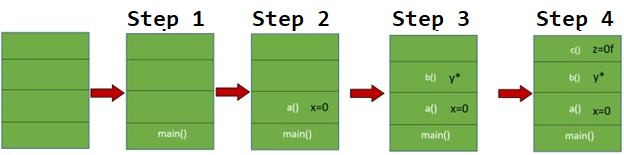
Fig: Contents of the stack at each stage of the program
In step #1: The main() method is pushed onto the thread’s stack.
In step #2: The a() method is pushed onto the thread’s stack. The a() method creates a variable x as primitive data type ‘int’ with value 0. This information is also held in the same stack frame. Note that because it’s a primitive data type, the actual variable with contents 0 is created in the stack frame.
In step #3: The b() method is pushed onto the thread’s stack. In the b() method, an object of class Car is created and assigned to the variable ‘y’. A crucial point to note here is that the Car object is created in the heap and not in the thread’s stack. Only the object’s reference pointer, i.e. y, is stored in the thread’s stack frame.
In step #4: The c() method is pushed onto the thread’s stack. The c() method creates a variable z with primitive data type float and a value ‘0f’. This information is stored in c()’s stack frame. Again, the actual variable containing 0f is stored in the frame, since it’s a primitive data type.
Once each method’s execution is completed, the frame containing the method, variables and object pointers is removed as shown in the diagram below.

Fig: Frames are removed from the stack as each method completes
What Causes StackOverflowError?
As we’ve seen, each thread’s stack stores active methods, each with local variables, object references and a return address. All of these consume memory.
When the JVM runs a program, the stack space is allocated a size limit, and if the stack tries to grow beyond this limit, the program terminates with a StackOverflowError.
Let’s look at a few reasons why this might happen.
1. A Method Calls Itself Recursively
The program below is ‘buggy’, in that method a() calls itself with no termination condition.
public class SOFDemo {
   public static void a() {
// Buggy line. It will cause method a() to be called infinite number of times.
         a();
         }

   public static void main(String args[]) {
         a();
       }
}
In this program, the main() method invokes the a() method. The a() method recursively calls itself. This will cause the a() method to be invoked an infinite number of times, and it will therefore be added to the thread’s stack an infinite number of times. Eventually, after many iterations, the thread’s stack size limit will be exceeded. When this happens, it will result in a StackOverflowError as shown below:
Exception in thread "main" java.lang.StackOverflowError
       at com.buggyapp.stackoverflow.SOFDemo.a(SOFDemo.java:7)
       at com.buggyapp.stackoverflow.SOFDemo.a(SOFDemo.java:7)
       at com.buggyapp.stackoverflow.SOFDemo.a(SOFDemo.java:7)
       at com.buggyapp.stackoverflow.SOFDemo.a(SOFDemo.java:7)
       at com.buggyapp.stackoverflow.SOFDemo.a(SOFDemo.java:7)
       at com.buggyapp.stackoverflow.SOFDemo.a(SOFDemo.java:7)
       at com.buggyapp.stackoverflow.SOFDemo.a(SOFDemo.java:7)
       at com.buggyapp.stackoverflow.SOFDemo.a(SOFDemo.java:7)
…
This is illustrated in the diagram below.

Fig: StackOverflowError Progression
2. Cyclic Relationships Between Classes
An example of a cyclic relationship is where Class A creates an object of type Class B, and Class B creates an object of type Class A. This will also result in an infinite recursion:
Class A creates a new Class B
Which creates a new Class A
Which creates a new Class B
And so on to infinity.
Each time the new class is created, its constructor method and any local variables within it are pushed onto the stack, which sooner or later will run out of space. This results in a StackOverflowError.
Let’s look at a simple example program:
package demos;
public class SOFDemo2 {

   public static void main(String args[]) {
         ClassA obj1 = new ClassA();
   }
}

class ClassA {
   public ClassA() {
        ClassB obj2 = new ClassB();
   }
}

class ClassB {
   public ClassB() {
        ClassA obj2 = new ClassA();
   }
}
Note that:
- The public class SOFDemo2 has a main() method, which creates an object obj1 of type ClassA. The main() method and the reference pointer for obj1 are pushed onto the stack.
- The constructor method of ClassA creates an object obj2 of type ClassB. The constructor method and the reference pointer to obj2 are pushed to the stack.
- The constructor method of ClassB creates an object obj3 of type ClassA. The constructor method and the reference pointer to obj3 are pushed to the stack.
- This process will theoretically loop to infinity, but in fact will eventually crash the JVM when there’s no more space in the stack.
This results in a StackOverflowError, as shown below:
Exception in thread "main" java.lang.StackOverflowError
        at demos.ClassB.<init>(SOFDemo2.java:17)
        at demos.ClassA.<init>(SOFDemo2.java:11)
        at demos.ClassB.<init>(SOFDemo2.java:17)
        at demos.ClassA.<init>(SOFDemo2.java:11)
        at demos.ClassB.<init>(SOFDemo2.java:17)
        at demos.ClassA.<init>(SOFDemo2.java:11)
        at demos.ClassB.<init>(SOFDemo2.java:17)
        at demos.ClassA.<init>(SOFDemo2.java:11)
        at demos.ClassB.<init>(SOFDemo2.java:17)
        at demos.ClassA.<init>(SOFDemo2.java:11)
3. Too Many Local Variables
This is a less common cause of StackOverflowError, but it can occasionally be a problem.
Consider this skeleton program:
Class ManyVariables{
   public processDatabase{
// Create a large number of variables
// Populate them
// Insert them into a table
// Call a method which will be repeated for all the rows in a large table
   while(condition)
      processRows();
   }
}
It creates and deals with a large number of variables at the beginning of the processDatabase() method. It then calls a method processRows(), which is likely to take a long time to run since it works through a large table.
For this entire period, all the variables created by processDatabase() remain in the stack, since the method hasn’t completed. The problem would be compounded if the program was multithreaded, and several instances of processDatabase() were running in different threads.
It’s possible that this scenario could result in a StackOverflowError.
It would be better to code the program like this:
Class ManyVariables{
   public processDatabase{
        populateData();
// Call a method which will be repeated for all the rows in a large table
       while(condition)
                 processRows();
   }
   private populateData(){
// Create a large number of variables
// Populate them
// Insert them into a table
   }
}
The code that creates lots of variables and deals with them has been moved to a new method populateRows(), which is called in place of actually doing the work in the method processDatabase(). Since populateRows() completes before the processRows() loop is called, the variables will have been popped off the stack, and won’t waste stack space while the long process is running.
The StackOverflowError Message
See the diagram below for a closer look at the error message produced by the sample program SOFDemo, which recursively calls the method a().

Fig: Breakdown of the Error Message
The first line is the error message, which identifies the thread that caused the error. In a simple, single-threaded application like this one, this doesn’t seem to be important, but in a multi-threaded application this is the first clue as to where to start debugging the error.
The rest of the message is the stack trace, which lets us trace the exact path the program took to reach the point where it crashed. It’s a list of frames that are currently on the stack. The first line shown in the stack trace represents the method at the top of the stack, which is the method that was executing at the time the error occurred. Subsequent lines trace each active (or uncompleted) method, back to the point where the current thread was initiated.
Looking at an individual line, as below, we see that it shows the class name and the method name, followed by the name of the file that contained the source code, and the line number within this file.
at com.buggyapp.stackoverflow.SOFDemo.a(SOFDemo.java:7))You can immediately see, by looking at the stack trace, that this program is in a tight loop in line 7 of the program, and it’s easy to find and fix the problem.Of course, the faulty program won’t always loop around a single line of code. Let’s look again at the stack trace for the program SOFDemo2, which illustrated a class being called recursively.
Exception in thread "main" java.lang.StackOverflowError
        at demos.ClassB.<init>(SOFDemo2.java:17)
        at demos.ClassA.<init>(SOFDemo2.java:11)
        at demos.ClassB.<init>(SOFDemo2.java:17)
        at demos.ClassA.<init>(SOFDemo2.java:11)
        at demos.ClassB.<init>(SOFDemo2.java:17)
        at demos.ClassA.<init>(SOFDemo2.java:11)
        at demos.ClassB.<init>(SOFDemo2.java:17)
        at demos.ClassA.<init>(SOFDemo2.java:11)
        at demos.ClassB.<init>(SOFDemo2.java:17)
        at demos.ClassA.<init>(SOFDemo2.java:11)
Looking at this trace, we see that it’s looping around two lines: line 11 and line 17, involving ClassA and ClassB. By tracing what happens between these lines, we can find and fix the recursion. In a larger program, there may be many more program lines involved. The trick is to look for a repeating pattern of lines in the stack trace, which indicates a loop.
StackOverflowError can be harder to diagnose if the program runs for a long time, or only crashes intermittently. For these difficult-to-diagnose problems, the yCrash tool can be extremely helpful in locating the issue. yCrash can be set up to capture and monitor diagnostics while a program is running. It identifies possible problem areas, and provides helpful charts and graphs of resource usage.
To simulate the situation with long-running programs, and demonstrate how yCrash can help, we can put a time delay into the demo program, and capture the diagnostics. The diagram below illustrates part of the output from yCrash, which has identified high CPU usage due to recursive looping.

Fig: yCrash Problem Reporting
yCrash also allows us to zoom in on problem areas for more information. In the image below, we see a more detailed report of the actual thread that is consuming CPU time.

Fig: yCrash Thread Details
Another useful tool, if you capture a thread dump while the program is still running, is FastThread. FastThread analyzes thread dumps, and can be invaluable in debugging issues in multithreaded programs. The image below shows part of the FastThread diagnostics for the program SOFDemo.

Fig: FastThread Intelligence Report
What are the Solutions to StackOverflowErrors?
There are a few different strategies that can be helpful in solving this type of problem.
1. Fix the Code
We looked at three scenarios in an earlier section where the program code results in a StackOverflowError:
- Recursive method calls,
- Cyclic relationships between classes;
- Too many local variables.
In all of these cases, the only solution is to fix the code. You can analyze the error message’s stack trace to find the problem, or use a tool such as yCrash to pinpoint the problem.
Fixing the code should always be the first solution to explore.
2. Increase the Thread Stack Size (-Xss)
There may be a legitimate reason for increasing the stack size. A thread might have to execute a large number of methods, or may need a large number of local variables. A multitasking program may need lots of threads, especially where many users are connected to a server.In these circumstances, you can increase the thread’s stack size using the JVM argument: ‘-Xss’. This argument needs to be passed when you start the application. For example, to run the program MyServer with a stack size of 2 megabytes, the command line would look like this:
java -Xss2m MyServerIncreasing the stack size should never be the default solution to StackOverflowError. Always check for faulty or badly-optimized code before opting for increasing the stack size, since a larger stack can affect performance in other areas.
You may ask: what is the default stack size? The answer varies depending on your operating system, and the type and version of your JVM. The table below is a rough guide to the default stack size.
| JVM version | Thread stack size |
| Sparc 32-bit JVM | 512k |
| Sparc 64-bit JVM | 1024k |
| x86 Solaris/Linux 32-bit JVM | 320K |
| x86 Solaris/Linux 64-bit JVM | 1024K |
| Windows 32-bit JVM | 320K |
| Windows 64-bit JVM | 1024K |
3. Creating a Thread with a Custom Stack Size
In a multithreaded program, it’s possible that only one of the threads needs a larger stack size. You can set the stack size of an individual thread using the constructor of the Java Thread class. You can find details in the Java documentation.
The syntax of the constructor looks like this:
public Thread(ThreadGroup group,
              Runnable target,
              String name,
              long stackSize)
The parameters are:
- The group to which this thread will belong;
- The target, which is an object of class Runnable;
- The name of the thread;
- The stack size specified in bytes.
While this option provides the flexibility to set a specific stack size for each thread, it’s important to note that its effectiveness might vary across different platforms. The impact will not be consistent across different types of JVM.
According to the Java documentation:
“On some platforms, the value of the stackSize parameter may have no effect whatsoever. The virtual machine is free to treat the stackSize parameter as a suggestion.”
In our own testing, we found that invoking this constructor with a custom stack size had no effect on platforms such as Windows and certain others. This lack of consistency across platforms makes this option less reliable as a universal solution. As best practice, it’s advisable to choose solutions that work consistently across all platforms to ensure the stability and reliability of your application.
Additional Reference
For more information, it’s worth reading this article:
java.lang.StackOverflowError – How to solve StackOverflowError
Summary
In this article, we’ve looked at how the stack works in Java, and some typical coding problems that might result in a StackOverflowError. We’ve touched on the tools you may use to debug the issue, including interpreting the stack trace, and using the yCrash tool.
The article has also explored some possible solutions, and seen where each may be appropriate.
Since StackverflowErrors are fairly common, especially in larger applications, it’s worth having a good understanding of the topic.
FAQ
Is StackOverflowError a checked or unchecked exception?
Checked exceptions are checked at compile time to ensure they have been thrown or caught in the code. The Java documentation states that “A checked exception is defined as any subclass of java.lang.Throwable (including Throwable itself) which is not a subclass”.
StackOverflowError is an unchecked exception, since its inheritance hierarchy is:
- java.lang.Object
- java.lang.Throwable
- java.lang.Error
- java.lang.VirtualMachineError
- java.lang.StackOverflowError
- java.lang.VirtualMachineError
- java.lang.Error
- java.lang.Throwable
What is the most common cause of StackOverflowError?
The most common cause is recursion: either a method that calls itself recursively, or a cyclic relationship between classes.
Can StackOverflowError be caused by something other than recursion?
Yes. In rare cases, StackOverflowError can be caused by too many local variables within a method, or by methods that are too deeply nested. It can also occur if the stack size is too small in a program that has a large number of threads, or needs deeply nested method calls.
When should I increase the stack size using -Xss?
If you’ve carefully checked the stack trace and the program source, and you’re sure there is no buggy or inefficient code, you can increase the stack size using the -Xss argument on the command line that invokes the program.
Are there any downsides to increasing the stack size?
Yes. This increases the amount of memory required by the program, and it may downgrade the performance of either the current application or the machine in general.
Can I set custom stack sizes for individual threads?
Yes, you can do this by specifying the stack size in the constructor when you create an object from the Thread class.

32 Pingback